
Business process automation (BPA) uses software to move work through a defined sequence of tasks, decisions, approvals, and records. Its purpose is not simply to make individual clicks faster. A useful automation completes the right transaction, prevents duplicate actions, handles uncertainty, and leaves evidence that someone can inspect.
In brief: Automate a defined outcome, not isolated clicks. Preserve source evidence, validate inputs, separate approval from execution, and make retries safe. Start with a bounded workflow and named exception owners, then compare correctly completed transactions, review effort, quality, and operating cost before expanding.
This guide focuses on those controls. An invoice workflow provides the running example, while a published Thermo Fisher Scientific case illustrates real results and their limits. The proposed workflow below is an illustrative design, not a claim about a client implementation. The same approach can support onboarding, order management, or service requests.
Map the process before choosing automation software
The Indonesian guide to documenting SOPs with AI can support process discovery. Compare its written procedure with actual transactions before choosing software; an SOP that ignores common exceptions is not yet a reliable automation specification.
Start business process automation with a process map that identifies the trigger, inputs, decisions, owners, systems, and final business outcome. Mapping reveals whether the work is ready for automation or whether inconsistent policy needs fixing first. Automating an unclear approval process usually spreads the confusion faster.
For accounts payable, define the start as receipt of an invoice through an approved channel. Define completion as a verified ERP record with its supporting evidence, not merely a successful document upload. Keep payment release outside this pilot unless the scope explicitly includes treasury controls.
Document the normal path and the deviations observed in recent work. Include missing purchase orders, unreadable attachments, disputed quantities, duplicate submissions, and supplier master-data changes. Record who resolves each issue and which system holds the authoritative value.
Write down the current handling time, waiting time, error categories, and transaction mix. These become the baseline. Without them, a dashboard can show more automated activity without demonstrating a better business process.
Use rules, RPA, and AI for different jobs
For a wider explanation, see intelligent automation and AI agents for business. Treat these as capability comparisons. An agent proposing a step must not silently acquire the authority to approve or execute that step.
Choose rules for explicit policy, integrations for system exchange, RPA for necessary interface work, and AI for interpreting uncertain inputs. These capabilities can coexist inside BPA, but they should not share unrestricted authority. Reading an invoice and authorizing its payment are different responsibilities.
- Rules: Check required fields, match currencies, apply approved tolerances, and select an approver from a maintained authority matrix.
- Integrations: Retrieve purchase orders or create approved records through supported APIs, with explicit response checks.
- RPA: Enter approved information through an application interface when a suitable integration is unavailable.
- AI: Extract information from varied documents or suggest a classification, subject to validation and review.
An AI confidence score is not permission to bypass policy. Even a confidently extracted bank account requires the supplier-change verification process. For adjacent decisions, the guide to AI for procurement covers a related business context; this article concentrates on transaction controls.
| Capability | Best suited for | Should not decide | Invoice workflow example |
|---|---|---|---|
| Rules | Explicit policy such as required fields, tolerances, and approver selection | Cases the written policy does not cover | Selecting an approver from the maintained authority matrix |
| Integrations (APIs) | Exchanging records between systems with explicit response checks | Whether a transaction is commercially valid | Retrieving the purchase order and creating the approved ERP record |
| RPA | Interface work where no suitable integration exists | Approval or exception outcomes | Entering approved data into a legacy application |
| AI | Interpreting uncertain inputs such as varied document layouts | Authorization or payment release | Extracting supplier, totals, and line items from an invoice |
| Human reviewers | Exceptions, conflicting data, and overrides | Routine cases the rules already settle | Resolving a quantity mismatch with the receiving team |
Build an end-to-end workflow with explicit handoffs
A team comparing integration approaches can consult the Zapier, Make, and n8n comparison and the n8n tutorial in Indonesian. Validate access, retries, and returned record identifiers in the chosen system instead of assuming a successful connection completes the workflow.
A complete invoice workflow should move from controlled intake to verified posting through named states and accountable handoffs. Each step must produce evidence for the next one. The following design separates document interpretation, business validation, approval, and ERP posting so that one successful step cannot silently imply another.
- Receive and register: Accept the invoice through an approved mailbox or portal. Assign a transaction identifier, preserve the source document, and record receipt time.
- Extract: Read the supplier, invoice number, date, currency, line items, and totals. Store extracted values separately from their original document locations.
- Validate: Check arithmetic, required fields, supplier identity, and relevant purchase-order and receipt records. Flag conflicting data rather than selecting a convenient value.
- Check duplicates: Compare the supplier, invoice identity, and existing ERP records using documented matching rules. Route ambiguous matches for investigation.
- Approve: Apply the maintained authorization matrix and business tolerances. Record the approver, decision, and supporting evidence. Prevent self-approval where policy requires separation.
- Post: Create the approved ERP record using a stable operation identifier. Capture the ERP response and resulting record identifier.
- Reconcile and close: Read the ERP record back, confirm important fields, link the evidence, and mark completion only after the checks pass.
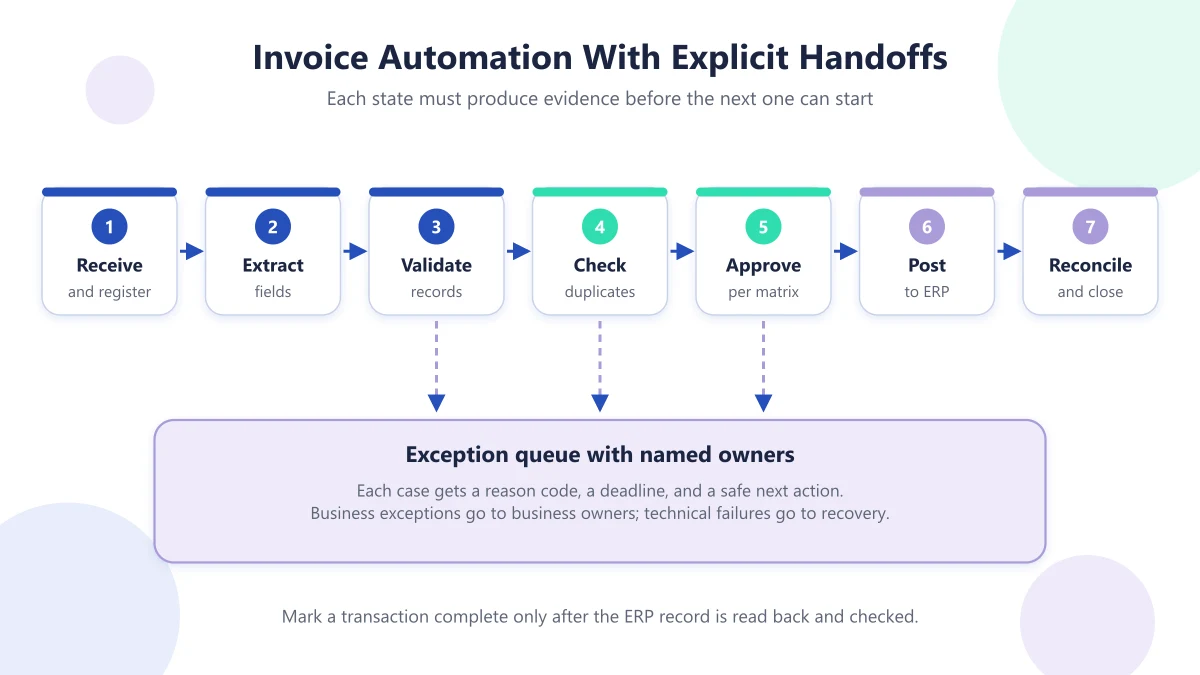
For example, a quantity mismatch should pause the transaction with the receiving team, not force accounts payable to guess. A valid invoice awaiting approval should remain visible as waiting work. Neither situation belongs in a generic technical-error queue.
Design exception handling before the happy path scales
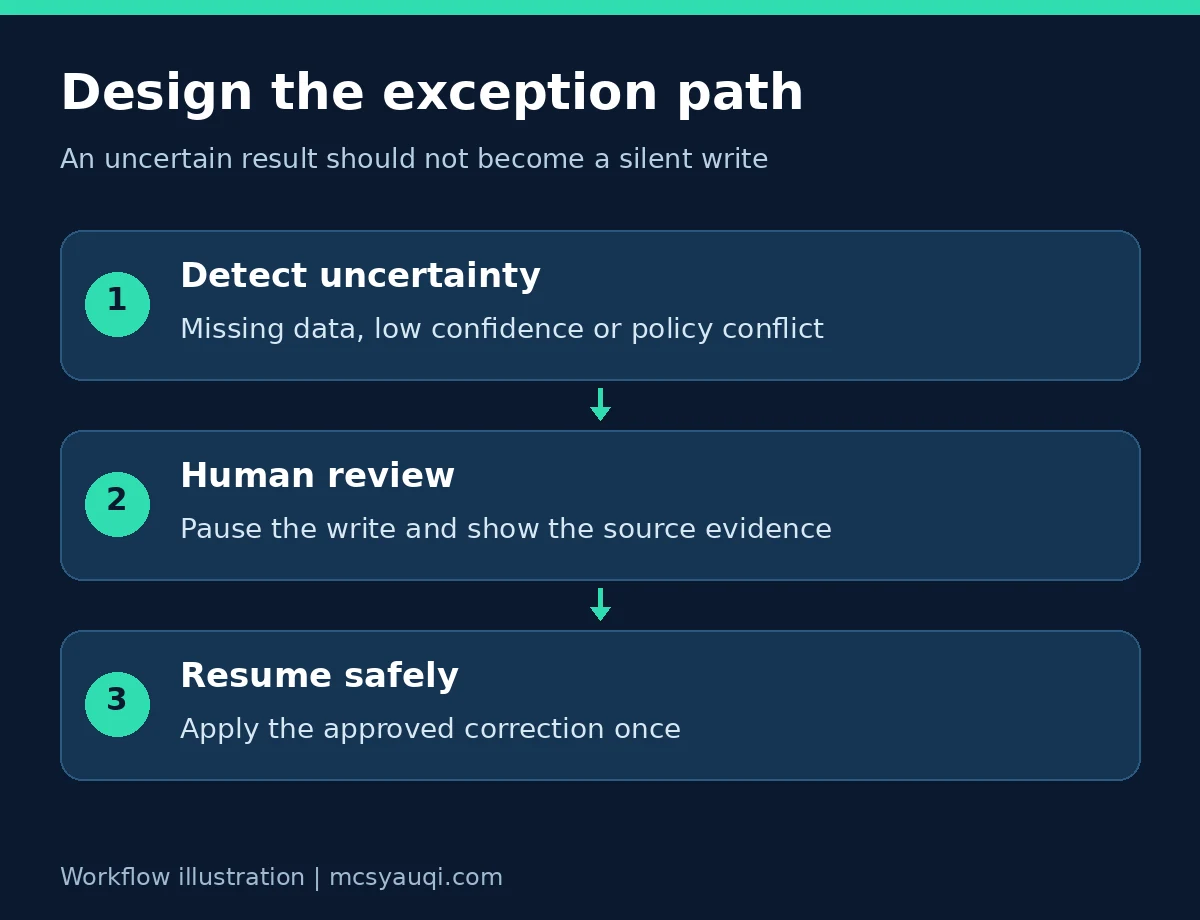
Exceptions need named owners, reason codes, deadlines, and safe next actions before production volume grows. A workflow that extracts documents quickly but leaves unresolved cases in an unattended queue has moved the bottleneck rather than removed it. Human review is a designed control, not an embarrassing workaround.
Separate business exceptions from technical failures. Missing receipt evidence belongs to a business owner. An unavailable ERP belongs to technical recovery. A suspected duplicate may need investigation, while an invalid supplier requires a stop until the relevant master-data process resolves it.
Give reviewers the original document, disputed fields, matching records, and permitted actions. Require a reason for overrides and record the changed values. Revalidate after a correction because changing the supplier or currency can affect earlier checks.
Set escalation paths and queue-aging alerts. A backup owner should cover absence. Do not let a timeout automatically approve work that a person has not reviewed.
Make workflow transitions deterministic and retries idempotent
Keep business decisions deterministic by applying versioned rules to recorded inputs, even when AI extraction is probabilistic. Make side-effecting actions idempotent wherever the receiving system supports it. Idempotency means repeating the same intended operation does not create additional effects, such as a second invoice record.
The AWS Builders’ Library explains safe retries using this distinction. A network timeout does not establish whether the remote action failed. Blindly repeating a create request can therefore duplicate the outcome.
Use states such as received, validated, awaiting approval, approved, posting, posted, and reconciled. Reject transitions that skip required evidence. Store the rule version and approved input snapshot so later policy changes do not silently alter an in-flight decision.
Keep the same idempotency key for retries of the same posting intent. Store its request fingerprint and outcome. Changed business inputs require an explicit revision, not casual key reuse. Where the ERP lacks native idempotency, use durable operation records and reconciliation; a local duplicate check alone cannot guarantee safe remote execution.
Build auditability and privacy into the data path
Auditability requires a traceable explanation of what happened, while privacy requires limiting the personal information collected, copied, and retained. Build both into the workflow design. An automation log should support investigation without becoming an uncontrolled archive of invoices, credentials, or supplier banking details.
Record transaction identifiers, state changes, timestamps, rule versions, service identities, approvals, overrides, and destination record references. Protect logs against unauthorized changes and restrict access by role. Keep secrets out of application logs and use managed credentials rather than shared personal accounts.
The UK Information Commissioner’s data-protection principles include data minimisation, storage limitation, security, and accountability. These are useful design considerations; applicable legal duties still depend on jurisdiction and processing context.
Set retention periods for source documents, extracted fields, and diagnostic logs separately. Before using external AI services, review access, storage locations, subprocessors, deletion arrangements, and whether inputs can be used for model training. Reviewers should see only the information their task requires.
Read the Thermo Fisher case as evidence, not a guarantee
Thermo Fisher Scientific’s published invoice-automation case shows how document extraction and human validation can work together. UiPath’s customer story reports a 70% reduction in invoice processing time and about 53% of invoices handled without human involvement. These are vendor-published customer results, not independent benchmarks or promised outcomes.
The Global Business Services team processed PDFs received from Coupa using UiPath Document Understanding. UiPath Action Center supported validation of extracted results and requests for missing information within the ERP-oriented invoice process. Teams in North America and Europe helped review extracted data.
The solution took about 12 weeks to design. Initial document-reading accuracy was 82.4%. The stated ambition was 85% or higher, so that higher figure must not be described as an achieved result. Reading accuracy also measures something different from the share of invoices completed without human intervention.
The story describes reduced workload for eight full-time employees managing about 824,000 invoices annually. It does not establish eight job losses or provide a transferable cash-savings figure. Useful lessons include starting with a bounded process, expanding by region, and giving stakeholders visibility through quality reports and performance metrics.
Use a pilot checkpoint to decide whether to expand
A pilot should end with an explicit decision to expand, revise, or stop, based on agreed acceptance criteria. Start with a bounded supplier group, document type, or business unit. Include representative exceptions rather than selecting only clean invoices that make the demonstration look successful.
Run in shadow mode first, comparing proposed decisions with reviewed outcomes without posting automatically. Then permit a restricted production path with approval and recovery controls. Test duplicate delivery, an ERP timeout after creation, changed invoice data, absent approvers, and an extraction error affecting a critical field.
At the checkpoint, review incorrect postings, unresolved duplicates, review effort, queue age, recovery behavior, and audit completeness. Finance should approve transaction controls; security and privacy owners should approve their respective risks. Define acceptable results before testing rather than inventing a threshold afterward.
Expansion should require evidence that the team can operate the workflow, not just that the software ran. Preserve a manual fallback and a named owner for stopping unsafe processing.
Measure operating cost per correctly completed transaction
Keep downstream records separate from operational activity counts. Financial reporting automation and customer feedback automation illustrate two different destinations: one reconciles financial information, while the other gathers service feedback. Each needs its own definition of a valid completed record.
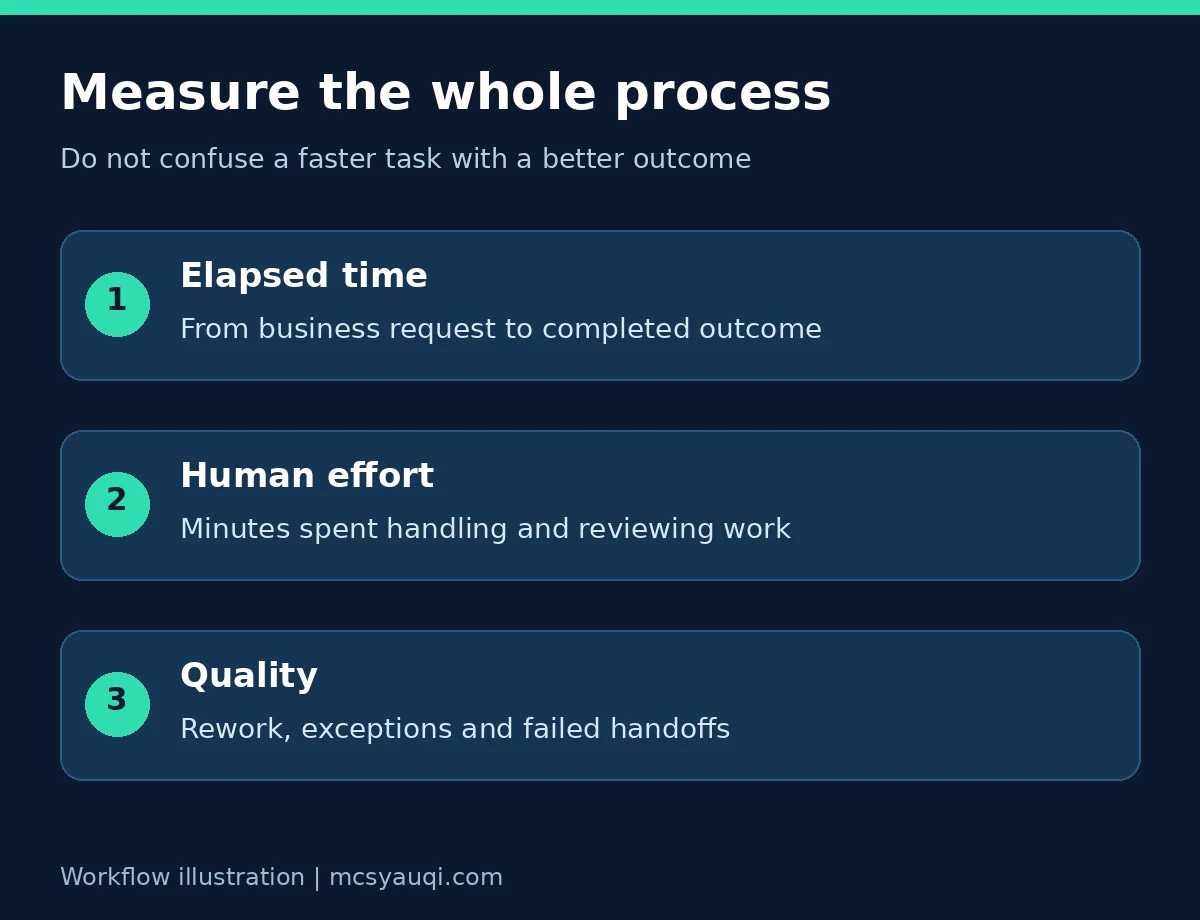
Measure BPA economics using end-to-end cost and verified outcomes, not bot activity or extraction speed alone. Track cost per correctly completed transaction alongside cycle time, exception rate, rework, and control failures. A workflow can appear faster while transferring significant work into review and maintenance.
Include licenses, infrastructure, document processing, integration upkeep, monitoring, incident handling, human validation, and periodic control reviews. Separate initial implementation spending from recurring operating costs. Compare equivalent transaction categories and record workload changes so a shift toward simpler invoices does not masquerade as improvement.
Released staff capacity is not automatically cash savings. State whether people handled more work, reduced overtime, improved service, or supported another process. Count a financial saving only when the relevant expense actually decreases.
For broader operational context, see AI in supply chain management. To discuss a scoped implementation, review the AI and automation service overview. An Indonesian-language business process automation article is also available. Bring a process map, baseline, and exception sample before selecting a platform.
Frequently asked questions about business process automation
What is the difference between BPA and RPA?
Business process automation coordinates an entire workflow, including decisions, approvals, records, and exceptions. Robotic process automation performs specific interface tasks, such as copying approved data into a legacy application. RPA can support BPA, but a bot alone does not define process ownership, approval policy, or recovery behavior.
Does business process automation require artificial intelligence?
No. Many workflows need only reliable integrations, clear rules, and approval routing. AI becomes useful when inputs require interpretation, such as extracting fields from varied invoices. Keep its output separate from authorization, validate important fields, and route uncertain or conflicting results to an accountable human reviewer.
Which business process should a company automate first?
Start with a recurring process that has a clear owner, measurable workload, accessible records, and understandable exceptions. Avoid choosing solely by transaction volume. A smaller workflow with stable rules and reversible actions often provides a safer pilot than a large process involving unresolved policy disputes or sensitive decisions.
How should a business measure automation ROI?
Compare verified benefits with the full cost of building and operating the workflow. Include integration maintenance, exception handling, monitoring, licenses, infrastructure, and controls. Track cost per correctly completed transaction alongside cycle time and error rates. Treat released staff capacity separately from cash savings unless expenditure actually falls.
How long should a business process automation pilot run?
Long enough to include representative exceptions and normal variation in volume, not just a clean demonstration week. Run in shadow mode first, comparing proposed decisions with reviewed outcomes, then allow a restricted production path. End the pilot at an agreed checkpoint with a documented decision to expand, revise, or stop.
What is idempotency, and why does it matter for retries?
Idempotency means repeating the same intended operation does not create additional effects, such as a second invoice record. It matters because a network timeout does not prove that the remote action failed. Stable operation identifiers and duplicate checks stop a retry after a timeout from posting the same transaction twice.
What should an automation audit log record?
Record transaction identifiers, state changes, timestamps, rule versions, service identities, approvals, overrides, and references to the resulting records. Protect the log against unauthorized changes and restrict access by role. Keep secrets, credentials, and unnecessary personal data out of application logs so the audit trail does not become an uncontrolled archive.
Who should own exceptions in an automated workflow?
Every exception type needs a named owner, a reason code, a deadline, and a safe next action. Business exceptions, such as missing receipt evidence, belong to the relevant business owner. Technical failures, such as an unavailable ERP, belong to technical recovery. Reviewers should see the source document, disputed fields, and matching records.